
In short
- A family calendar only works if everyone can see it and add to it, not just the person who runs the house.
- Keep it simple: one calendar, one colour per person, and the same few types of events.
- A 10-minute weekly check-in is what turns a calendar into a shared plan.
Why one person ends up as the calendar
In many families, one person is the calendar: she knows when the school trip is, who has football on Thursday and when the car needs its check. Sociologist Allison Daminger calls this kind of work cognitive labour: anticipating needs, deciding and keeping track. A 2019 study by Ciciolla and Luthar linked feeling solely responsible for running the household with feeling more overwhelmed.
A shared calendar doesn't fix everything, but it moves the information out of one head and into a place everyone can see.
Choose one place
- Digital (a shared phone calendar) if everyone has a phone and checks it.
- Paper (on the fridge) if you have young children or someone who never checks their phone.
- Both, if needed, but decide which one is the "real" one.
What goes in it
- School: holidays, trips, deadlines for forms and payments.
- Activities: classes, matches, rehearsals, with who drives.
- Health: appointments, vaccines, check-ups.
- Home: bins, deliveries, repairs, bills with a due date.
- Birthdays and events, with a reminder a week before for gifts.
Make it easy to read
- One colour per person, plus one for the whole family.
- Write who is responsible, not just what happens: "Pick-up: Dad".
- Add reminders for things that need preparation, not just the event itself.
The weekly check-in
Once a week, for ten minutes, look at the next seven days together. Who drives where? What needs buying? What is missing? This is the moment to share the thinking, not just the doing. Older children can join and add their own plans.
Digital or paper: a quick comparison
| Shared digital calendar | Paper calendar on the fridge | |
|---|---|---|
| Best for | Adults and teenagers with phones | Families with young children |
| Reminders | Automatic | Only if someone looks |
| Easy to update | From anywhere | Only at home |
| Visible to everyone | Only if they open it | Always, in the kitchen |
| Risk | Nobody checks it | Out of date when plans change |
Many families use both: digital for the adults, and a simple weekly sheet on the fridge for the children.
A sample week, colour-coded
| Day | Mum (green) | Dad (blue) | Lucía, 9 (orange) | Pablo, 6 (purple) | Family (grey) |
|---|---|---|---|---|---|
| Mon | Late meeting | Pick-up | Swimming 5 pm | — | — |
| Tue | Pick-up | Gym 7 pm | — | Football 5:30 pm | Bins out |
| Wed | Dentist 4 pm | Pick-up | Trip form due | — | — |
| Thu | Pick-up | Late shift | Swimming 5 pm | — | Grandma for dinner |
| Fri | Free evening | Pick-up | — | Party 4 pm (present?) | Pizza night |
Writing who is responsible next to each event is what moves the thinking out of one head.
Common mistakes
- Two calendars that don't match. Decide which one is the main one.
- Only one person updating it. Whoever receives the information adds it.
- No reminders for preparation. "Party Friday" is not enough; add "buy present Wednesday".
- Too much detail. Keep it to events, owners and deadlines.
Start this weekend
Print our free family calendar template, fill in next week together and agree on one rule: whoever hears about a plan writes it down.
Keep it alive
The calendar works when adding things is a habit for everyone. If only one person updates it, it becomes one more task on her list. Agree that whoever receives the information (a message from school, a party invitation) adds it straight away.
 How Senda helps
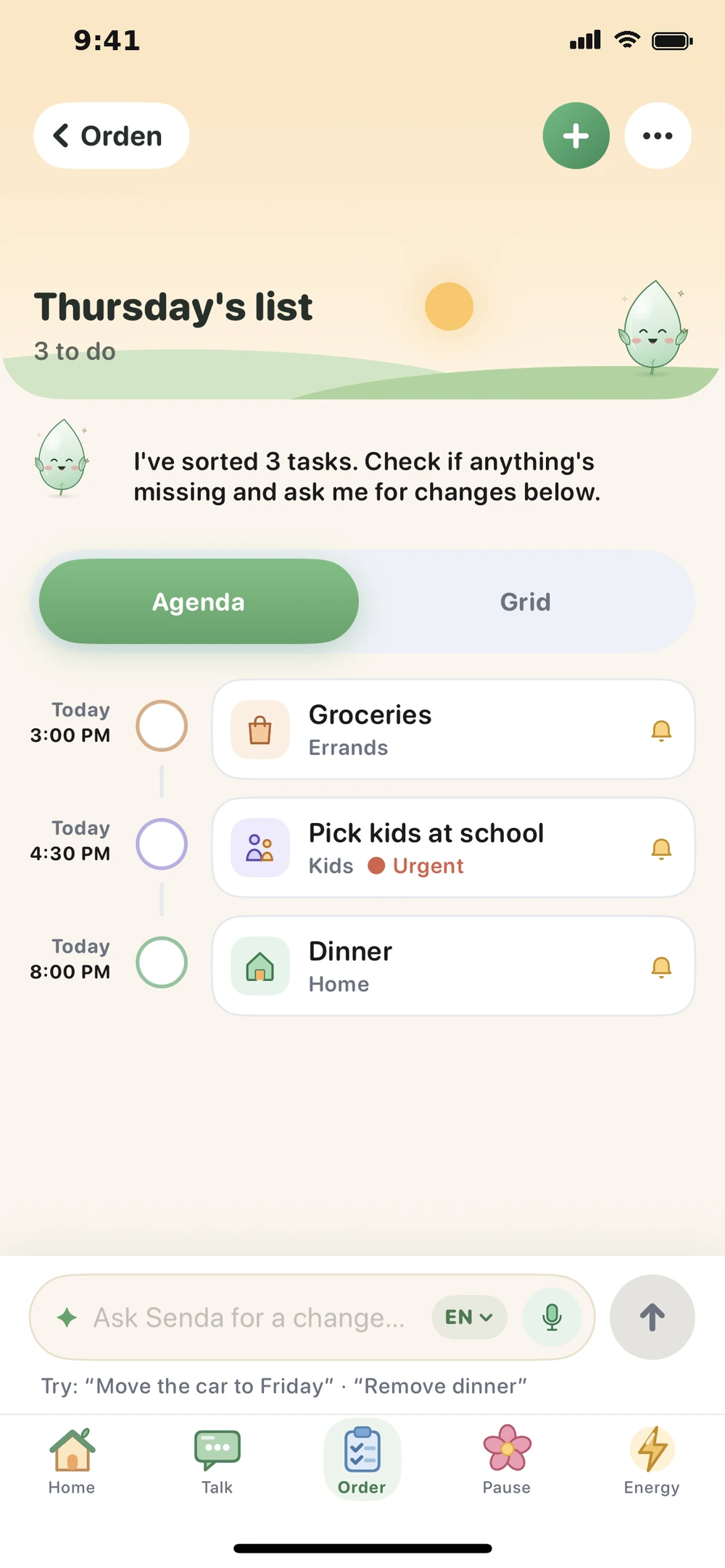
In Order, you dictate everything at once, however it comes out ("dentist Tuesday at 5, gift for Lucía, pay the gym") and Senda turns it into tasks with dates, categories and reminders. Change it just by saying so.
- Plan around your energy: Senda shows your level for the day.
- Vent in Talk when the list feels like too much.
- Protect a real break in your plan.
Free plan, no card needed. 3-day free trial.
Frequently asked questions
What is the best way to organise a family calendar?
Use one shared calendar that everyone can see, one colour per person, clear names for who is responsible, and a 10-minute weekly check-in to plan the coming days together.
Should a family calendar be digital or on paper?
Digital works when everyone checks their phone; paper on the fridge works better with young children. If you use both, decide which one is the main one.
How do I stop being the only one who manages the family schedule?
Agree that whoever receives the information adds it to the calendar, share the weekly check-in, and give each adult ownership of some areas, like activities or appointments.
What should not go on a family calendar?
Keep it to things that affect more than one person: events, appointments, deadlines and who is responsible. Personal to-dos belong on each person's own list.
How do I get my family to use the calendar?
Put it where everyone sees it, keep it simple, do a short weekly check-in together and agree that whoever receives information about a plan adds it straight away.
Sources
Keep reading


Senda is a self-care and organization companion, not a medical service. This guide is informational and does not replace advice from a qualified professional.